There is a saying in IT that you don't really have a backup until you've tested restoring it.
I've also learned another important rule over the years:
If your backup lives in the same place as the thing you're backing up, it isn't really a backup.
My unRaid server has slowly become the centre of my home network. It runs Docker containers, media services, Home Assistant, websites, databases, security cameras and a pile of other things that I would really rather not have to rebuild from scratch.
So I needed a backup strategy that was:
- Easy to maintain
- Automated
- Local and fast
- Protected from a server failure
- Protected from a house failure
- Encrypted
- Affordable
- And, ideally, didn't involve shipping all my data to a U.S. data centre
Being Canadian, that last one has become increasingly important to me.
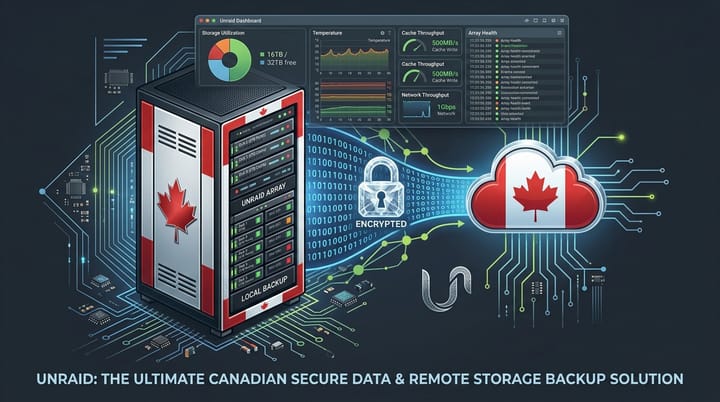
My current solution uses three layers of backup:
- Appdata Backup for quick local backups on the unRaid server
- ZeroByte for backups to external storage
- ZeroByte + Backblaze B2 CA East for an encrypted off-site cloud backup stored in Canada
It gives me the convenience of local backups while still giving me a proper disaster-recovery option if my server, house or local backup drive disappears and yes, there is something satisfying about having my data sitting in a data centre in Toronto instead of automatically being sent to the United States.
Why I don't trust a single backup
The problem with backups is that the failure you are protecting against is usually the thing that can also destroy the backup.
If I back up my unRaid server to another folder on the same server, I'm protected from:
"Oops, I deleted that file."
I'm not protected from:
"The server died."
If I back up to another drive inside the same server, I'm protected from a drive failure.
I'm not protected from:
"The house had a very bad day."
And if I only use cloud storage, I now have to depend on my internet connection and a cloud provider every time I need to restore something, so I use multiple layers. My basic philosophy is:
- Fast local backup + independent local backup + encrypted off-site backup.
That gives me several ways to recover depending on what actually went wrong.
The backup strategy
Here's how I have it laid out.
                         MY UNRAID SERVER
                               │
             ┌─────────────────┴─────────────────┐
             │                                   │
             ▼                                   ▼
       Appdata Backup                         ZeroByte
             │                                   │
             ▼                           ┌───────┴────────┐
       Local Backup                      │                │
                                         ▼                ▼
                                  External Drive     Backblaze B2
                                                       CA East
                                                       Toronto
The two tools have different jobs:
- Appdata Backup is primarily about making it easy to recover my Docker applications and unRaid configuration.
- ZeroByte is my broader backup engine. It handles encrypted, scheduled backups to local and remote repositories and uses Restic underneath. ZeroByte currently supports local repositories as well as S3-compatible storage such as Backblaze B2.
That separation is important, I don't want one application doing absolutely everything.
Part 1 – Install appdata backup on unRaid
The first thing I want protected is my Docker appdata. If you've been running unRaid for any length of time, your /mnt/user/appdata directory probably contains a ridiculous amount of important information.
- Home Assistant configuration.
- Jellyfin configuration.
- Frigate configuration.
- Ghost configuration.
- Databases.
- VPN settings.
- Download applications.
- Media management applications.
And probably at least one Docker container that you installed three years ago and are now afraid to touch because you can't remember how you configured it.
That is exactly the sort of stuff I want backed up.
The current Appdata Backup plugin is available through unRaid Community Applications and provides backup and restore of Docker volumes and metadata, along with the unRaid flash drive.
Install appdata backup
From the Unraid web interface:
- Apps → Search for "Appdata Backup"
Make sure you select the current Appdata Backup plugin.
There are several similarly named plugins floating around, including older Appdata Backup/Restore versions. The older v2/v2.5 plugin was deprecated for unRaid 6.12+, so don't accidentally install the old version just because it has a familiar name.
Click:
- Install
Then configure the plugin.
Configure the local appdata backup
The exact options can change as the plugin is updated, but the basic idea is straightforward.
I configure the plugin to back up the Docker appdata that I actually care about.
I don't necessarily need every single temporary or disposable Docker container backed up.
For example, if I can reinstall a container in five minutes and all of its important data lives somewhere else, there isn't much value in keeping dozens of copies of its configuration. The important stuff gets backed up. For my setup, that includes things such as:
- Home Assistant
- Frigate
- Jellyfin
- Ghost
- MariaDB
- Network-related services
- Media management applications
- Other containers where the configuration would be annoying to recreate
I also recommend including the unRaid flash drive in your backup strategy.
Your USB flash drive contains your unRaid configuration, and losing it can turn a relatively simple recovery into a much more annoying exercise.
How often should you run appdata backup?
I run my local appdata backup automatically and daily is a good starting point. If you are constantly changing configurations, you may want more frequent backups. The key is not to create 900 copies of the same thing. You want a sensible retention policy. For example:
- Daily backups for the last week
- Weekly backups for several weeks
- Monthly backups for longer-term recovery
The exact retention period depends on how much storage you have available.
Storage is cheap compared with rebuilding a server at 2:00 AM while everyone else in the house is sleeping.
Where should the appdata backup live?
Don't put your only backup inside the same Docker appdata directory you're backing up. If your appdata is:
/mnt/user/appdata
don't create your only backup inside:
/mnt/user/appdata/backups
That's convenient but it is also a little too much like putting your spare house key inside the house. Instead, I use a separate backup location, for example:
/mnt/user/backups/appdata
or another dedicated backup share. The important thing is that the backup is separate from the original data.
Part 2 – Install ZeroByte
This is where my backup strategy gets more serious. I use ZeroByte for the second layer. ZeroByte is a backup management application built around Restic. It provides scheduling, encryption, compression and retention policies and can back up to multiple repository types and it is available directly through unRaid Community Applications. Go to:
- Apps → Search → ZeroByte
- Install it.
The current unRaid template exposes the ZeroByte web interface on port 4096 by default and stores its application data separately from the backup repositories. Once installed, open the ZeroByte web interface.
Configure ZeroByte
The first thing I would recommend is making sure ZeroByte itself is properly configured before throwing terabytes of data at it. Set your:
- Time zone
- Base URL
- Application secret
- Storage location
- Repository locations
The application secret is important because ZeroByte uses it to protect sensitive information stored by the application. Don't use:
password123
Don't use your dog's name, don't use the same password you use everywhere else. Generate a proper random secret and protect it somewhere safe for when you need it.
Create a local repository
My first ZeroByte repository is local. This is the backup I want to be able to restore quickly. For example, I might have a dedicated backup location such as:
/mnt/user/backups/zerobyte
or another dedicated storage location on the unRaid server.
In ZeroByte:
- Repositories → Create Repository
Select a local repository and point it at your backup location and then create a backup job.
What I back up with ZeroByte
This is where I go beyond Docker appdata. I don't just want my applications, I also want my actual data. Depending on your setup, that might include:
/mnt/user/appdata
/mnt/user/documents
/mnt/user/photos
/mnt/user/home
/mnt/user/backups
Obviously, don't blindly back up everything.
If you have 30 TB of movies and TV shows that can simply be downloaded again, you probably don't need to send all 30 TB to cloud storage.
- Your personal photos?, Absolutely.
- Family videos?, Absolutely.
- Important documents?, Absolutely.
- Docker configurations?, Definitely.
- Your carefully curated media library?, That's a personal decision.
Don't back up what you can easily recreate
One of the biggest mistakes people make with backups is treating every byte equally. I don't need to back up:
- Docker image layers
- Cache files
- Movies and Shows
- Temporary downloads
- Transcoding directories
- Re-creatable application files
- Other disposable data
I care about the stuff that would hurt to lose and this makes backups smaller, faster and cheaper.
Encrypt your backups
This is one of the reasons I like the ZeroByte/Restic approach, my backups aren't just sitting there as a pile of readable files. ZeroByte uses Restic and supports encrypted repositories. That's especially important when the backup is leaving my house. Because here's the thing:
A backup is still sensitive data.
- My backup contains copies of my life.
- Family photographs.
- Documents.
- Configuration files.
- Potentially passwords or secrets contained within application databases.
I don't want anyone who happens to obtain my backup drive, or access my cloud storage, to simply mount it and start browsing.
Encryption should be part of the backup design from day one.
Part 3 – Add an external local backup
Now we get to the part that makes me feel a little better about the whole thing. I have another copy outside the primary unRaid storage. This could be:
- USB hard drive
- External SSD
- Another server
- NAS
- Network storage
- Another physical machine
For my purposes, an external hard drive makes a lot of sense.
- It's inexpensive.
- It's easy.
- And I don't need another enterprise server sitting in the basement just to hold my backups.
Connect the external storage to the system and make it available to ZeroByte, then create another repository. For example:
/mnt/external-backup/unraid
Now I have:
Unraid
   ↓
ZeroByte
   ↓
External Backup Drive
If one of my unRaid drives dies, I still have another copy.
Don't leave the backup drive permanently connected
If your external backup drive is permanently connected and mounted, then ransomware or another destructive event could potentially access it too.
For really important data, I like the idea of having at least one backup copy that isn't permanently connected.
That's where the classic: 3-2-1 backup rule still makes sense.
Three copies.
Two different types of media.
One copy off-site.
You don't need to build a Fortune 500 data centre in your basement, you just need to avoid having every copy of your data fail at the same time.
Part 4 – Back up to Backblaze B2
I use Backblaze B2 for the off-site copy but there's an important Canadian twist here. I'm not interested in sending my data to a U.S. data centre simply because "that's where cloud storage lives."
Fortunately, Backblaze has a CA East region located in Toronto, Ontario. When creating a B2 account, you select the storage region, and the CA East region keeps the account's data in Canada. Backblaze says the region is selected when the account is created and cannot simply be changed later.
Canada, Now we're talking.
Create Your Backblaze B2 Account
Create a Backblaze B2 account and select:
- CA East
Do not casually choose the default region and assume you can move it later because Backblaze states that the region selected when the account is created determines where the account's data is stored, and changing regions later requires creating another account and moving the data. So this is one of those:
- Read the screen before clicking Next moments.
And yes, I have learned the hard way that clicking Next without reading things is how you end up redoing crap and wasting time.
Create a B2 Bucket
Once your account is created, create a bucket specifically for your unRaid backups. Something like:
sooley-unraid-backups
or:
unraid-backup
Keep it dedicated to backups and don't dump random files into the same bucket just because you can.
Create an application key
Next, create an application key specifically for your backup bucket. This is better than handing your backup software the keys to the entire Backblaze account. Give it only the permissions it actually needs. If ZeroByte only needs to access one bucket, restrict the key to that bucket. That's another simple security rule:
- Give applications the minimum access they need.
Add Backblaze B2 to ZeroByte
Now go back to ZeroByte and create another repository.
Select the appropriate S3-compatible storage option and configure it for Backblaze B2.
You'll need the information provided by Backblaze, including the bucket and credentials.
The exact ZeroByte interface can change as the project develops, so I recommend following the current ZeroByte documentation for the current Backblaze configuration rather than blindly copying a screenshot from a blog post that is six months old. ZeroByte's documentation currently lists Backblaze B2 among its supported S3-compatible repository destinations. The basic architecture is:
Unraid
   │
   ▼
ZeroByte
   │
   ▼
Encrypted Restic Repository
   │
   ▼
Backblaze B2
   │
   ▼
CA East
Toronto, Ontario
That's the part I really like, my backup is encrypted before it leaves my network.
My backup schedule
The exact schedule will depend on your server and how much data changes every day. My basic approach is:
- Daily: Appdata backup. This gives me a quick way to recover Docker applications and configurations.
- Daily or Several Times Per Week: ZeroByte backup to local external storage. This catches changes to important files and data.
- Daily: ZeroByte backup to Backblaze B2. Important data gets copied off-site automatically.
- Periodically: Test the backups. This is the part people forget.
Test your backups
A backup that has never been restored is a backup you are assuming works. Every once in a while, pick something. Maybe it's:
family-photo.jpg
- Restore it.
- Open it.
- Make sure it works.
Then take it a step further, restore an application configuration somewhere safe and make sure your database backup isn't just a file that exists. Make sure your encrypted repository can actually be accessed.
If you have a spare drive, practice rebuilding something.
Because the worst possible time to discover your backup is broken is when you actually need it.
My unRaid backup philosophy
My home lab has become complicated enough that I no longer want to rely on memory.
- I don't want to remember how I configured Ghost three years from now.
- I don't want to recreate my Home Assistant setup.
- I don't want to spend a weekend rebuilding Frigate.
- And I certainly don't want to explain to my family why all of our photos disappeared because I thought I had a backup.
So I automate it and my approach is deliberately boring:
- Appdata Backup → fast local recovery
- ZeroByte → independent local backup
- ZeroByte → encrypted off-site backup
- Backblaze B2 CA East → Canadian cloud storage
It's not exciting, it doesn't require a $10,000 enterprise backup appliance, it doesn't require a rack full of servers, and most importantly, once it's configured properly, I don't have to think about it very often.
Which, in my opinion, is exactly what a good backup system should do.
Final thoughts
One of the reasons I built an unRaid server in the first place was to take more control over my own data. I'm not interested in uploading every photo, document and configuration file to whatever cloud service happens to be popular this year.
- I want my data here.
- On my network.
- Under my control.
So my current backup philosophy is simple:
- Keep it local.
- Keep another copy somewhere else.
- Encrypt it.
- Automate it.
- Test it.
- When possible, keep it Canadian.
- and keep it boring.
Because if I'm going to build an unnecessarily complicated home lab in my basement, I might as well protect it properly and maybe, just maybe, stop giving my data a free vacation in the United States.